VPN Split Tunneling – How It Works and When to Use It
Choose which apps and sites can stay outside of the VPN tunnel with PIA’s split tunneling
- Bypass the VPN by app, IP address, or domain
- Speed up low-security browsing and streaming
- Connect to your local network with your VPN still on
- 30-day money-back guarantee for new subscribers

What Is VPN Split Tunneling?
Imagine running your banking and other trusted apps on your standard connection, and reserving your VPN for less-trustworthy apps and websites. That’s split tunneling.
PIA takes this basic concept one step further by allowing you to choose between standard and inverse split tunneling. This makes it easy to bypass the VPN by default and specify apps to protect, or use the VPN by default and bypass selectively. We also offer unique split tunneling features for Windows Store apps, Linux, and DNS requests.

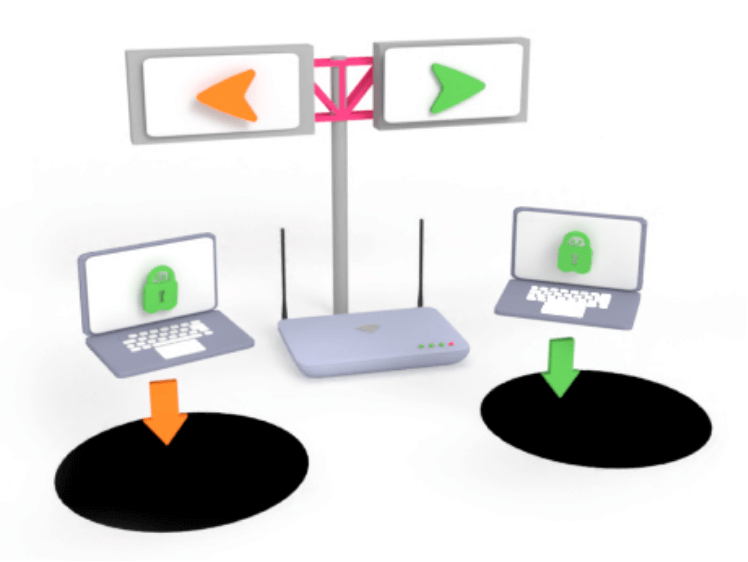
How Split Tunneling Works
VPN split tunneling divides your connection into two streams according to certain rules you decide. One stream sends your traffic through the secure VPN tunnel, while the other stream bypasses the VPN and sends traffic directly to the internet.
Types of Split Tunneling
Different VPNs offer different ways of splitting your traffic, which can be summarized by the following four categories. PIA VPN offers all of these methods:
- App-based split tunneling: You decide which apps will use your VPN connection and which ones will be excluded.
- Inverse split tunneling: You select which apps or URLs won’t use your VPN connection. The rest of the traffic goes through VPN protection.
- Route-based split tunneling: Traffic uses or bypasses the VPN based on set IP addresses or predetermined networks.
- URL/Domain-based split tunneling: You choose which websites or domains you want to exclude from your VPN when browsing the web.

Practical Uses for VPN Split Tunneling
Split tunneling is a great solution to a few problems. It gives you complete VPN protection over your data and devices, without hampering access to apps and services that aren’t VPN-friendly. Here are some common use-cases:
Using local network services
Using a VPN can interfere with accessing local network devices such as printers. Split tunneling allows you to bypass connections to these, keeping them outside the VPN tunnel.

Speeding up bandwidth-heavy apps
If you only need the VPN for certain tasks like work emails, you can route streaming traffic and large downloads outside the VPN so they don’t compete for bandwidth.

Work-specific routing
If you need a VPN for work, but don’t want to send your personal traffic through your employer’s network, you can route only your work apps through the VPN tunnel.

Using apps not compatible with VPNs
Some apps don’t play nicely with VPNs. You can continue using them while protecting the rest of your traffic by excluding them from the VPN tunnel.
How to Set Up VPN Split Tunneling in 3 Steps
PIA’s intuitive desktop and Android apps make setting up split tunneling a cinch

Open the PIA App
On your desktop or Android system.

Navigate to Split Tunneling settings
Or per-app settings on Android.

Configure Split Tunneling rules
Bypass the VPN by app or IP.
Configure PIA’s Split Tunneling to Suit Any Need

Split Tunneling by App or IP
Choose which apps, websites, and IP addresses run inside or outside PIA VPN. You can even specify entire subnets.

Inverse Split Tunneling
Run everything through our VPN, then select what to leave outside. This is great if most of your apps require VPN protection.

App-Based Kill Switch
Prevent data leaks on a per-app basis. Even if your connection to our server drops, your data and location will remain private.

Windows Store App Support
PIA supports the .appx Windows Application Package format so you can easily filter VPN traffic by Windows Store apps.

Advanced Linux Functionality
Decide whether all docker or VM packets bypass PIA VPN or run through it, in addition to all our other split tunneling options.

Split Tunnel DNS
Run all DNS requests through PIA with one click. This feature is available for Windows and Linux and is exclusive to PIA.
Trusted By Millions Of Satisfied Customers
Here's a small sample of our most positive user reviews. All Trustpilot reviews are available here.
{"tweetsBtnText":"{Tweets}","userBtnText":"{User Reviews}","influencersBtnText":"{Influencers}","techReviewsBtnText":"{Tech Reviews}"}REVIEWED BY:


Choose The Plan That's Right For You
1 Month
$11.95/mo3 Years + 4 Months
$1.98/mo1 Year
$3.33/mo Covered By Our 30-Day Money-Back Guarantee
All amounts are shown in USD, and any discounts reflect a reduction based on the current monthly service pricing at $11.95 per month.
FAQ
VPN split tunneling allows you to choose which apps and sites run through your regular unencrypted connection, and which ones go through the VPN tunnel. This comes in handy when you want fast connections for local news, gaming, or work, but need added protection of VPN encryption when accessing banking apps and other sensitive accounts.
Yes. Split tunneling is safer than not using a VPN, but it’s important to remember that traffic outside the VPN won’t be encrypted. You should only run trusted apps and websites outside your VPN, and keep everything else inside to ensure you benefit from the VPN’s protection. PIA’s split tunneling settings include an app-based kill switch, which gives you more safety and convenience while using a VPN.
Yes. PIA is one of the best VPNs for split tunneling. It offers app-based, inverse, IP/domain-based, and route-based options, so you can configure your VPN precisely to your needs. We also offer a per-app kill switch and Windows Store app compatibility. Our Linux app even includes routed packet splitting.
The general rule is if you don’t trust an app, website, or IP, route it through the VPN. Most apps should run through the VPN to protect your privacy online, but some exceptions exist. Running certain services like regional channels outside the VPN could provide a small speed boost. Some local network resources such as printers may require a local IP address, so some of these services will also need to run outside the VPN.
VPN split tunneling works by allowing different kinds of traffic to both use and bypass the VPN simultaneously. You can set rules for your VPN so it knows which apps, domains, and networks to use with or without the VPN.
There are four main types of VPN split tunneling: app-based, inverse, route-based, and domain-based split tunneling. App-based split tunneling is the most common type, offered by many VPN services. PIA VPN offers all four types, allowing you to configure your VPN exactly how you want.
PIA’s split tunneling feature is available on Windows, Linux, and macOS (pre-Monterey only). It allows both standard and inverse split tunneling. You also get several advanced options, including routed packet splitting for Linux and compatibility with Windows Store apps.
PIA also offers standard split tunneling on Android devices, and supports allowlisting on our VPN browser extensions for Chrome and Firefox.
Still Not Convinced? Download PIA VPN Risk-Free
You're covered by our 30-day money-back guarantee. If you're not satisfied, request a refund.


Per our Terms of Service, using PIA VPN for illegal purposes is prohibited.