Download a VPN for Linux
Get the privacy, security, and performance you need with feature-packed VPN for Linux
- Full GUI compatible with Ubuntu, Mint, Debian, Fedora, and Arch
- Open-source and independently audited
- Fast 10-Gbps infrastructure supports streaming, gaming, and P2P
- 30-day money-back guarantee for new subscribers
*Requires Ubuntu 20.04+ (LTS), Mint, Debian, Fedora, or Arch.
Protection for All Your Devices
How to Install the PIA VPN App on Linux
How to Set Up a VPN on Linux
Get strong privacy protection for your favorite Linux distro with PIA’s user-friendly GUI


Step 2
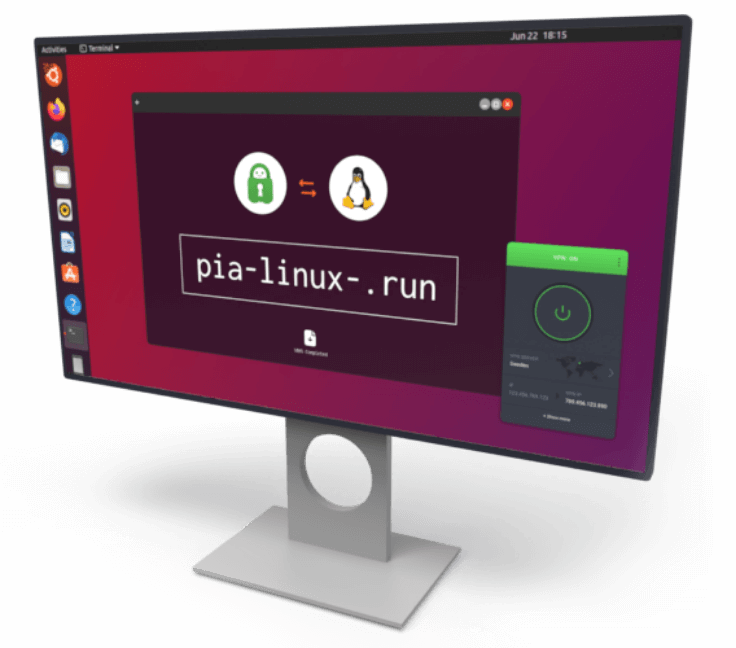
Navigate to your downloads directory in the terminal.

Step 3
Install the PIA app with sh pia-linux-[version number].run

What Is a Linux VPN?
A Linux VPN is a virtual private network designed to run on Linux systems. It encrypts your internet traffic, masks your IP address, and routes your data through a secure server. This protects your privacy and helps keep your personal data and online activity safe from hackers or snoops on your network.


Get a VPN with a Full GUI for Major Linux Distros
Control your VPN without learning a bunch of terminal commands. PIA’s clean and intuitive graphical interface makes it easy to connect, change servers, switch protocols, and set up advanced features like split tunneling or port forwarding.
You can secure your traffic in just a few clicks with PIA’s ready-to-use Linux VPN app versions for Ubuntu, Mint, Debian, Fedora, and Arch.
Everything You Need in a VPN for Linux, and More

154 VPN Locations
Get access to servers in 91 countries worldwide for a secure and reliable local connection.

Super Fast Speeds
Get a consistently fast VPN connection with our high-speed 10-Gbps server network and lightweight app.

Strong Encryption
Keep your data secure in transit from your device to its destination and back with super-strong encryption.

Reliable Leak Prevention
Keep your real IP address and browsing data hidden with PIA’s built-in DNS leak protection and advanced kill switch.

Custom Settings
Fine-tune your VPN’s encryption level, security protocols, MTU, and more, to balance speed and security.

Per-App Routing
Choose which apps run through the VPN and which bypass it with PIA’s customizable split tunneling.

Ad and Tracker Blocking
Filter ads and malicious content before they load and get cleaner, faster, more private browsing with PIA MACE.

P2P Compatibility
Secure your P2P traffic and real IP address for safer and more private file sharing across all PIA servers.

24/7 Support
Our Linux app is simple to use. But if you ever have a question, 24/7 support is just a click away.

Get a VPN for the Most Popular Linux Distros
Protect your connection on Ubuntu, Arch, and many others; PIA VPN works seamlessly across devices and leading 64-bit Linux distributions.
Works on Desktop, Mobile, and More
Get consistent protection on all your Linux devices, including Raspberry Pi and other mini PCs, desktops and laptops, and high-performance servers.
Wide Linux Compatibility
Run PIA with full support on popular 64-bit Linux distributions, including Ubuntu, Mint, Debian, Fedora, and Arch. The app also includes beta support for ARM devices, offering more flexibility for lightweight or custom Linux builds.
How to Install PIA VPN on Linux
Installing PIA VPN for Linux is as simple as installing the app and running an installation command in your terminal, but if you prefer a manual setup, you can do so via the terminal or network manager.
Need help getting started? Check out our step-by-step guide for installing a VPN on Linux along with our support pages for manually installing the PIA Linux VPN app, manually configuring PIA VPN on Linux, and controlling PIA VPN via the command line.
PIA VPN for Linux Specification and System Requirements
| Protocols | WireGuard and OpenVPN |
| Encryption | 128-bit AES, 256-bit AES, 256-bit ChaCha20 |
| Transport | UDP / TCP |
| Proxies | SOCKS5 and Shadowsocks |
| Ports | UDP ports 8080, 853, 123, 53, 1197, 1198TCP ports 8443, 853, 443, 80 501, 502 |
| Supported OS Versions | Ubuntu 20.04+ (LTS), Mint, Debian, Fedora, Arch |
| Minimum system requirements | 64-bit system architectures including systemd, sysvinit, and openrc-based systems. You can use PIA on Linux ARM64 but you need to download a specific version of the VPN. |
Should I Use a Free Linux VPN?
Free VPNs can seem appealing, but they often come with trade-offs. Some don’t support popular distros or lack a GUI, making them difficult to set up and use. Others might log your activity, compromising your digital privacy.
PIA offers a secure, no-logs Linux VPN that offers a full GUI and strong encryption. When you subscribe for the first time, you also get a 30-day money-back guarantee, so you can try our VPN for Linux completely risk-free.
No Logs, No Doubts, Just Privacy
Privacy is the foundation of everything we do. You don’t have to take our word for it – our commitment has been independently audited, tested, and publicly verified.

Audited by Deloitte
Rest assured that we truly honor our no-logs claims. The results of a recent independent audit performed by Deloitte showed that our server setup aligns closely with our privacy policy.

Court-Proven No-logs Policy
Your online activity stays private with PIA. Legal proceedings have confirmed that we don’t log your activity, and our quarterly transparency reports show we never have data to hand over.

Open-Source VPN
Get full transparency and control. Our VPN apps are open source, so anyone can inspect how your data is handled.
Trusted By Millions Of Satisfied Customers
Here's a small sample of our most positive user reviews. All Trustpilot reviews are available here.
{"tweetsBtnText":"{Tweets}","userBtnText":"{User Reviews}","influencersBtnText":"{Influencers}","techReviewsBtnText":"{Tech Reviews}"}REVIEWED BY:


Choose the Plan That's Right For You
 All Plans Are Covered by Our 30-Day Money-Back Guarantee
1 Month
$11.95/mo3 Years + 4 Months
$1.98/mo1 Year
$3.33/mo Covered By Our 30-Day Money-Back Guarantee
All amounts are shown in USD, and any discounts reflect a reduction based on the current monthly service pricing at $11.95 per month.
VPN for Linux: Frequently Asked Questions
Linux might be more secure than some other OSes, but it doesn’t do anything extra to protect your privacy online, so using a VPN with Linux is a good idea. PIA VPN protects your privacy with strong encryption and gives you location flexibility with servers in {country_no} countries. PIA also masks your IP address, making it harder to track you online, plus you get access to our built-in ad and tracker blocker, MACE.
PIA is the best VPN for Linux. It offers a full GUI, advanced privacy features, open-source app, and is compatible with popular distros, including Ubuntu, Mint, Debian, Fedora, and Arch. Plus, it’s backed by a strict no-logs policy. New subscribers can try it risk-free with a 30-day money-back guarantee.
Like Ubuntu and Linux Mint, Kali Linux is part of the Debian family, so depending on your system configuration, you may be able to just install the PIA Linux VPN app. Alternatively, you can install and use PIA manually via the terminal.
Ubuntu doesn’t have a built-in VPN, but neither do other Linux distros. It does support VPN services, though, so you can download a VPN for Ubuntu or set it up via the command line. PIA VPN’s dedicated app for Linux is fully compatible with Ubuntu. Simply download PIA VPN and open it via the terminal to connect to a server.
PIA VPN supports manual OpenVPN setup through the Terminal. Just import your OpenVPN configuration file, enter your credentials, and connect. Alternatively, you can simply install our Linux VPN app on your device.
Different VPNs use different commands for this. If you’re using PIA VPN, you can simply use the piactl connect command to connect, but you need to have installed and configured the VPN first. PIA makes this easy with our Linux VPN app, which you can install with a single command.
PIA is the best VPN for Ubuntu. It’s a market leader when it comes to configurability, so you can set it up just how you like it. We also give you blazing-fast speeds, P2P compatibility, proven privacy, strong online protection, and a 30-day money-back guarantee for new subscribers.
PIA provides a full GUI for its Linux VPN app – no complicated command line configuration required. We cover the most popular Linux distros, including Ubuntu, Mint, Debian, Fedora, Arch, and more.
Still Not Convinced? Download PIA VPN Risk-Free
You're covered by our 30-day money-back guarantee. If you're not satisfied, request a refund.


Per our Terms of Service, using PIA VPN for illegal purposes is prohibited.